Brand kit
Amara Moon logo packet
Everything you need to place the brand anywhere — the mark, the wordmark, colours, and a few rules. Vector files scale to any size; PNGs come baked from the live type for places the font isn't installed.
Read the brand & strategy bibleGrab a single asset from any card below, or take the whole set in one archive. The vector packet downloads instantly; the full kit also renders a high-resolution PNG of each lockup.
The mark
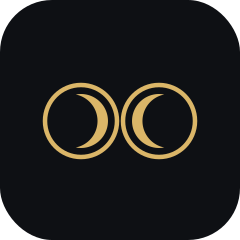
Two rings — the “OO” of MOON — the left one cradling a crescent moon. Use it on its own where the full name already appears nearby, as an app icon, or as a favicon. Keep the rings equal and never redraw the crescent.



The wordmark
The primary lockup. The rings stand in for the “OO”, so the name always reads AMARA MOON in caps. PNG is baked from the live Jost type, so use PNG where the font may be missing.
Stacked lockup
A centred, stacked alternative for tight or square placements — mark above the name.
Colour
Tap a value to copy it.
Ink
Background
Gold
Logo, CTAs, rules
Bone
Text on ink
Moss
Secondary
Clear space & usage
- Do
- Keep clear space around the mark equal to the height of one ring.
- Use gold on dark; ink on light. Keep strong contrast.
- Scale the mark and wordmark proportionally.
- Don't
- Recolour the rings outside the palette or add effects.
- Stretch, rotate, or redraw the rings or the crescent.
- Set the name in another typeface or in mixed case.